How to Build an Amazon Keyword List That Actually Drives Sales (Not Just Clicks)
Most Amazon keyword lists optimize for traffic. Here’s how to build an Amazon keyword list that prioritizes buyers, not browsers.


There’s a number that looks great in a keyword tool and quietly destroys your margin. It’s the one with 50,000 monthly searches and a 1% conversion rate.
Compare that to a term with 5,000 monthly searches and an 8% conversion rate. Same ad spend. The second keyword generates six times more purchases.
Most Amazon sellers never run that math. They sort by search volume, chase the biggest numbers, load their listings and campaigns with category-generic terms, and wonder why their ACoS keeps climbing while units stay flat.
Keyword research is more than a traffic decision. Ultimately, it’s a revenue decision. The two things are related but not the same, and confusing them is one of the more expensive mistakes a growing Amazon brand can make.
Ready to Start Growing Your Amazon Brand?
Canopy’s Partners Achieve an Average 84% Profit Increase!
Find out moreThe Difference Between Traffic Keywords and Conversion Keywords
Every keyword on Amazon sits somewhere on a spectrum between awareness and purchase. Understanding where a keyword sits determines how much it’s actually worth to you.
Awareness keywords are broad. “Office chair.” “Vitamin C serum.” “Dog bed.” They generate massive impressions because they describe a category. They also attract every shopper at every stage, including people who are browsing, researching, comparing, or just curious. That’s not your buyer.
Decision keywords carry intent. “Ergonomic office chair for lower back pain.” “Vitamin C serum with hyaluronic acid 20%.” “Orthopedic dog bed for large breeds joint support.” These shoppers know what they want. They’ve done the research. They’re on Amazon to buy.
Amazon gives you the data to measure this difference directly. The Search Query Performance report (SQP), available in Brand Analytics within Seller Central, shows search query purchase rate, which is the percentage of shoppers who search a term and then purchase a product from those results. This is the metric most sellers aren’t sorting by.
The long tail paradox follows from this: lower-volume, more specific keywords tend to have higher purchase rates because the specificity of the query signals decision-stage intent. Somebody searching “ergonomic lumbar support office chair adjustable armrests black” isn’t window shopping.
Step 1: Start with Your Own Search Query Performance Data

The best keyword research for your brand starts with what’s already working, not with what’s working for someone else.
Pull your SQP report from Seller Central: Brand Analytics > Search Query Performance. Filter by your ASIN or product group for the trailing 90 days.
Sort by search query purchase rate, not impressions, not clicks. This column tells you which search terms are driving actual purchase behavior for your product.
Look for two specific signals:
Money keywords. These are terms with strong purchase rates where you’re currently ranked below the first page. You’re converting when shoppers find you, but most shoppers aren’t finding you. These deserve immediate attention in both listing optimization and PPC bidding.
Unconverted keywords. These are terms where you’re getting clicks but not purchases. They might look good on paper (high impressions, decent click-through) but they’re burning budget. Before writing them off, check whether they represent a different buyer intent than your product actually serves. Sometimes the listing is the problem. Sometimes the keyword just doesn’t fit.
One pattern we see across accounts: brands spend months optimizing for terms where they rank on page 1 but convert poorly, while ignoring mid-funnel terms where they rank on page 3 and convert at twice the rate. The SQP report makes this visible. Most sellers never look.
Step 2: Competitive Reverse-Engineering

Your own data only shows you the keywords shoppers used when they found you. Competitive research shows you what you’re missing.
Third-party tools like Helium 10 (Cerebro) and Jungle Scout (Keyword Scout) let you pull the keyword rankings of any ASIN on Amazon. The goal isn’t to copy competitor keyword lists wholesale. It’s to find specific gaps.
Start with two or three direct competitors who are ranking well for terms you’re not. Pull their keyword data and filter for terms where they rank on page 1 and you rank on page 3 or beyond. Then cross-reference those terms against your SQP purchase rate data.
If a term exists where a competitor ranks highly but you outperform them on purchase rate when shoppers do find you, that’s a high-priority gap. You’re the better conversion outcome for that search query. You just need the rank to match.
The “steal the middle” strategy works particularly well here. Page 1 positions on high-volume terms are expensive to compete for organically and often dominated by established players with deep review counts. Page 2 competitors are much more vulnerable. Find the terms where you’re competing against page 2 incumbents rather than page 1 leaders, and prioritize rank improvements there first. The conversion rate payoff is faster and the bid costs lower.
Step 3: Build a Keyword Tier Framework

A keyword list without structure is just a spreadsheet. A tiered framework tells you exactly where each keyword belongs in your listing and campaigns.
Tier 1 (Core): 5 to 10 keywords
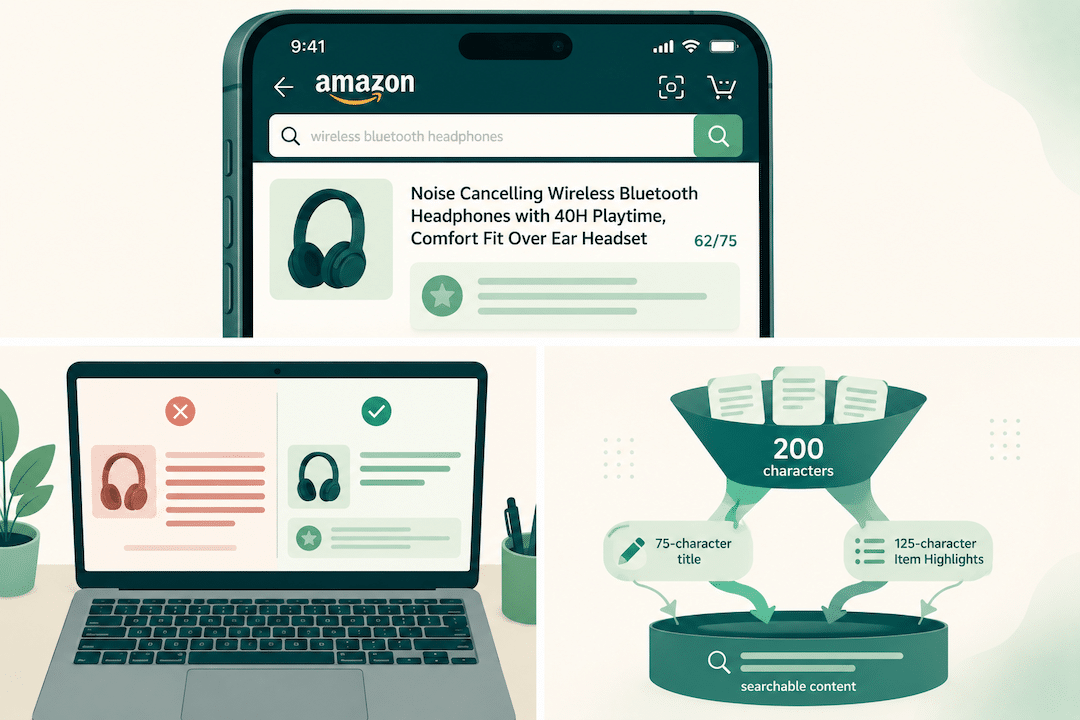
High purchase intent. Directly relevant to your primary product use case. These belong in your title and the first bullet point, where Amazon’s algorithm weighs them most heavily. Compete for page 1 rank on these terms above everything else.
Example: for a posture corrector, “posture corrector for men back straightener” would be Tier 1. “Back brace” probably wouldn’t. One has decision intent; the other attracts a much wider (and less qualified) pool.
Tier 2 (Qualified): 20 to 40 keywords
Secondary terms that add specificity through attributes: size, material, use case, audience, benefit. These belong in bullets 2 through 5, your product description, and your main PPC campaigns. They support Tier 1 with additional conversion pathways.
Tier 3 (Long Tail): 50 to 100+ keywords
Ultra-specific terms with lower search volume and high purchase intent. These go into backend search terms and PPC broad/phrase match campaigns for bid testing. They often have low competition and strong conversion rates. Don’t ignore them because the volume looks small.
Map each tier explicitly to where it lives in your listing. The mistake most sellers make is treating all keywords as equally important and distributing them randomly. Your title has more ranking weight than your backend search terms. Use your strongest Tier 1 terms there, not your generic category terms.
Step 4: Validate with PPC Before Committing to Organic

This step separates sellers who build listing strategies on assumptions from sellers who build them on data.
Before you reorganize your title or bullets around a keyword, run a validation campaign. Set up an exact match campaign targeting the keyword with a modest daily budget and let it run for 14 days. Track impressions, clicks, orders, and ACoS.
ACoS is doing two things in this context. It’s measuring ad efficiency, yes. But it’s also functioning as a proxy for buyer intent quality. A keyword that converts at low ACoS in exact match is telling you something about the shoppers using that term. They’re buyers. A keyword that burns budget with few conversions is telling you the opposite.
The conversion rate threshold that justifies prioritizing a keyword organically varies by category and margin profile. The rough principle: if a keyword converts profitably in exact match PPC, it deserves a spot in your organic listing. If it can’t convert with forced placement (exact match at the top of results), adding it to your title won’t fix the problem.
Kill the underperformers early. Don’t move them to broad match hoping something shakes loose. Broad match on a poor-intent keyword just gets you more impressions on the wrong shoppers.
The Keywords Most Sellers Overlook
Some of the highest-converting search terms on Amazon are hiding in plain sight because they don’t look like traditional product keywords.
Problem-state keywords. Shoppers searching “best pillow for neck pain” or “protein powder for women who don’t want to bulk” have already done their research and articulated their specific problem. The conversion rates on these terms are consistently strong in our experience across accounts. Look for the search queries in your SQP report that describe a problem rather than a product category.
Occasion and gifting keywords. “Gifts for hikers,” “graduation gift for daughter,” “anniversary gift for husband who has everything.” These terms trend seasonal but often carry high purchase intent year-round. Competition is typically lower than equivalent product category terms, and shoppers using them are actively trying to spend money.
Comparative keywords. “Alternative to [brand name].” “Better than [competitor product].” These terms are underused partly because sellers don’t think to check them and partly because they feel aggressive. But shoppers who search them have already disqualified a competitor and are open to alternatives. That’s a buyer at the very bottom of the funnel.
Seasonal and trend keywords. The window to capture these is before they peak, not during. Use Helium 10’s search volume trend data to watch for emerging terms 6 to 8 weeks before expected peak season. By the time a trend keyword is showing up everywhere, the CPCs have already adjusted. Getting in early, while volume is building, captures rank before the auction gets expensive.
Ready to Start Growing Your Amazon Brand?
Canopy’s Partners Achieve an Average 84% Profit Increase!
Find out moreKeyword Research Is a Revenue Decision
The question to keep asking is not “how many people search this?” The question is “how many of those people buy?”
Build your keyword list around purchase intent, not search volume. Start with your own SQP data, because it shows you the real conversion behavior on your actual listing. Layer in competitive research to find the gaps. Tier your keywords so every term has a home and a purpose. Validate the most promising ones through PPC before you reorganize your organic strategy around them.
The brands that outperform their category on Amazon aren’t always the ones with the biggest budgets or the most reviews. They’re often the ones that figured out earlier which keywords actually move revenue and stopped wasting spend on the rest.
If you want to see what that looks like applied to your specific account, our Amazon SEO team works through exactly this framework with every partner from day one. Or if you’d rather start with a benchmark, request a free account audit and we’ll show you where your current keyword strategy is leaving money on the table.
Canopy Management delivers end-to-end eCommerce growth, leading the industry in Amazon marketplace strategy while powering expansion through Shopify, Meta, and Google. Our full-funnel approach — from marketplace optimization to customer acquisition — has generated over $3.3 billion in partner revenue and made us the trusted growth engine for brands worldwide.
FAQ
The SQP report is available in Seller Central under Brand Analytics > Search Query Performance. It shows impression share, click share, purchase share, and search query purchase rate for any term associated with your brand’s ASINs. You need Amazon Brand Registry to access it. It’s updated weekly and is one of the most underused data sources in Amazon selling.
Amazon gives you 250 bytes for backend search terms. The common mistake is stuffing repetitive variations or repeating terms already in the title. Focus on non-redundant Tier 3 long-tail terms, competitor brand terms (where policy allows), and alternate spellings. Don’t repeat words already in your title; Amazon’s algorithm already indexes those.
Amazon allows bidding on competitor brand terms in PPC. Whether it’s worth it depends on your conversion rate when you’re the sponsored result for that search. Shoppers searching a specific brand name are often already sold on that brand, which generally means lower conversion rates for alternatives. The exception is the “alternative to [brand]” query pattern, where the shopper has already rejected the incumbent. Test with small exact match budgets before scaling spend here.
Review your SQP data monthly. Run a deeper competitive keyword audit quarterly or when a significant new competitor enters your category. Keyword intent doesn’t change overnight, but search volume trends, seasonal patterns, and competitor rankings shift enough that a keyword strategy built six months ago can be meaningfully stale.
Amazon indexes text in your title, bullets, description, backend search terms, and A+ Content module text. A+ Content does contribute to indexing, but backend search terms typically process faster and more reliably for new keywords. Use A+ Content to reinforce Tier 1 and Tier 2 terms naturally within the copy. Don’t sacrifice readability to keyword-stuff it.
Thinking About Hiring an Amazon Management Agency?
Canopy’s Partners Achieve an Average 84% Profit Increase!
Let’s talk