Amazon Advertising: The Beginner’s Guide to Profitable PPC Campaigns
Most first Amazon PPC campaigns waste budget before gathering a single useful data point. Here’s the framework that changes that!


Most new Amazon sellers approach PPC the same way. They set up a Sponsored Products campaign, pick some keywords they think are relevant, enter a bid that feels reasonable, and check back in a few weeks to see what happened.
What they find is usually a lot of spend and not much clarity about where it went.
The problem isn’t that Amazon PPC is too complicated. The problem is that most introductions to it skip the part that matters most: how to gather real data before you start making decisions. This guide is structured around that idea. Get data first, optimize second.
What is Amazon PPC?
Amazon PPC is an auction-based advertising system where you pay each time a shopper clicks your ad. The ads appear in search results, on product detail pages, and in some cases off Amazon entirely.
Three ad types are available to most sellers:
Sponsored Products are the ads you see in search results and on product pages. They promote individual ASINs. This is where almost every seller should start because the feedback loop is fast and the data is specific.
Sponsored Brands feature your brand logo, a custom headline, and a selection of products. They’re useful for building brand recognition, but they’re not a beginner’s tool. Come back to these once you understand what’s working at the product level.
Sponsored Display targets shoppers on and off Amazon based on audience behavior. Treat this as advanced territory for now.
Start with Sponsored Products. Get that right first.
The Decision Most Beginners Get Wrong: Auto vs. Manual

When you create a Sponsored Products campaign, Amazon asks you to choose between automatic targeting and manual targeting. Most beginners either pick the wrong one or don’t understand what they’re choosing.
Here’s how to think about it.
Automatic campaigns let Amazon’s algorithm decide where your ads appear, matching your product to relevant search queries and product pages based on your listing information. You don’t pick the keywords. Amazon does. The upside is that auto campaigns surface search terms you would never have thought to target. The downside is that you can’t control exactly where your budget goes until you’ve built up enough data to know what’s working.
Manual campaigns give you full control. You choose the keywords, set individual bids, and decide which match types to use. The problem is that manual campaigns require a foundation of real data to work well. Without it, you’re guessing.
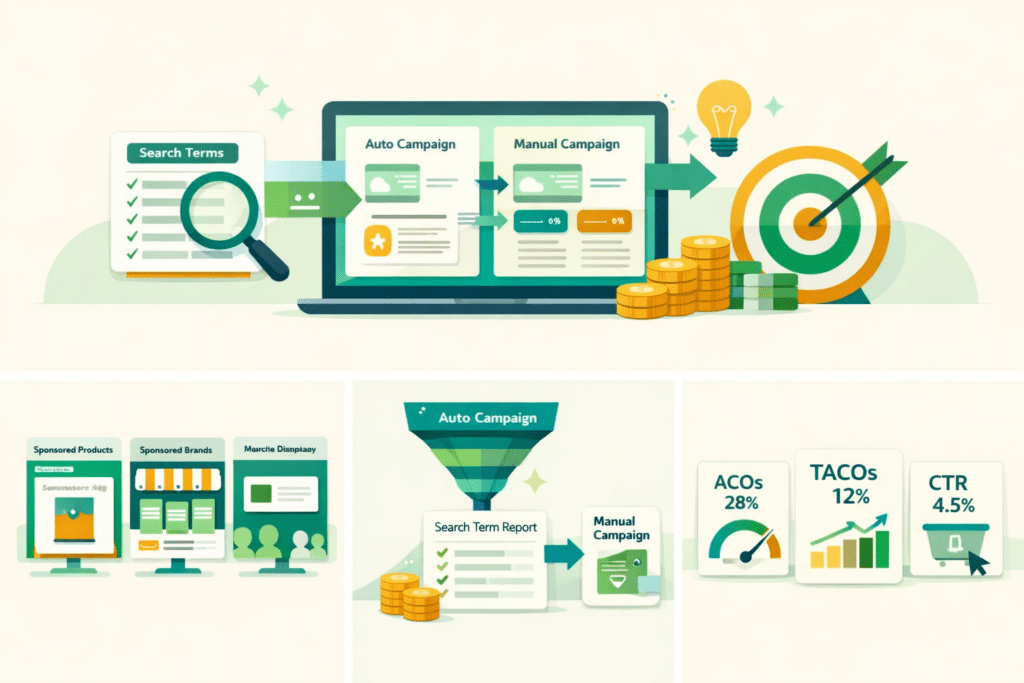
The right starting sequence: launch an auto campaign first, let it run for at least two weeks, then mine the Search Term Report to find what’s actually converting. Take those converting terms and build your first manual campaign around them. Add them as negative keywords in the auto campaign so you’re not competing with yourself.
This is the auto-to-manual workflow, and skipping it is one of the most expensive mistakes beginners make.
Match Types: What They Mean in Practice
Once you move into manual campaigns, you’ll need to choose match types for your keywords. The mechanics matter less than understanding what each type is trying to do.

Exact match shows your ad only when someone searches your keyword very closely. The traffic is tighter and more predictable. Start here with your best-performing terms from the Search Term Report.
Phrase match shows your ad for searches that include your keyword phrase in order, with other words before or after. Broader reach, more variation in what you’re showing up for.
Broad match shows your ad for searches that contain some form of your keyword in any order. It casts the widest net and burns budget fastest on terms that aren’t converting. Don’t start here. Earn it by understanding your exact and phrase match performance first.
As a rule: push your budget toward exact match when you know something works, and use broader match types cautiously to discover new territory. The Search Term Report tells you what those broader searches are actually producing.
Setting Bids: Tie Them to Your Margin, Not a Benchmark
Most beginner guides recommend a target ACoS of 25-30% as if it’s a universal standard. ACoS is ad spend divided by ad revenue, expressed as a percentage. But 25% ACoS on a product with a 20% margin means you’re losing money. And 40% ACoS on a product with 60% margins might be quite profitable.

The number you actually need is your break-even ACoS, which is simply your profit margin before advertising. If your product nets 35% margin after Amazon fees and COGS, then an ACoS below 35% means advertising is profitable. Above 35%, you’re subsidizing sales.
During a product launch, accepting ACoS above your break-even threshold is often the right call. You’re buying data, building sales velocity, and helping the algorithm understand what your product is. The industry typically treats 35-50% ACoS as acceptable in the launch phase. As your conversion rate improves and your organic ranking builds, you tighten bids toward your break-even target.
Start your auto campaign bids conservatively, around $0.75-1.00, and let Amazon gather data. Adjust based on what the Search Term Report shows you about what’s actually converting, not based on intuition about keyword value.
Your Listing Quality Determines Whether Your Ad Spend Works
PPC drives traffic. Your listing converts it. If the listing is weak, no amount of advertising skill will fix your ACoS.
Before you spend meaningfully on ads, make sure your listing can do its job:
Your title should lead with the most important keyword and describe what the product actually is. Not a keyword-stuffed string of terms, but a clear description that includes the primary search term naturally.
Your images need to show the product clearly, demonstrate scale or context, and answer the visual questions a shopper has before they decide to click. The main image determines whether someone clicks your ad at all. Everything else determines whether they buy.
Your bullet points and description should speak to the specific benefit the shopper cares about, not just the feature list. Sellers who describe outcomes (“stays cool through a full eight-hour shift”) convert better than sellers who describe specifications.
Reviews matter more than most new sellers expect. A listing with fewer than 15-20 reviews will convert at a fraction of the rate of a comparable listing with 50-100. Advertising into thin review counts is an expensive way to gather data.
Ready to Start Growing Your Amazon Brand?
Canopy’s Partners Achieve an Average 84% Profit Increase!
Find out moreThe Metrics That Tell You What’s Actually Happening
Amazon gives you a lot of numbers. These are the ones that matter for a beginner:
ACoS tells you how much you’re spending per dollar of ad revenue. Track this at the campaign level and, eventually, at the keyword level.
TACoS (Total Advertising Cost of Sale) divides your ad spend by total revenue, including organic sales. This is the more honest view of how advertising is affecting your business overall. A falling TACoS over time means your advertising is building organic momentum, not just buying sales.
CTR (Click-Through Rate) is the percentage of impressions that become clicks. A low CTR usually means either the wrong keywords are triggering your ad (targeting problem) or your main image isn’t compelling enough to earn the click (listing problem).
Conversion rate is the percentage of clicks that become purchases. Average conversion rates for Sponsored Products run around 8-15% depending on category, price point, and review count. If your conversion rate is well below that range, advertising more aggressively will make your ACoS worse, not better.
Look at these together, not in isolation. High CTR with low conversion rate means you’re attracting clicks from shoppers who aren’t buying, which could be a listing quality issue or a price issue. Low CTR with decent conversion rate means you need to improve how your product appears in search.
The Mistakes That Quietly Drain Budget
Running auto campaigns without negative keywords. Auto campaigns will show your ads for search terms that have nothing to do with your product. Some of this is unavoidable in the early data-gathering phase, but once you see what’s not converting in the Search Term Report, add those terms as negatives. Do this weekly during your first month.
Setting campaigns to “set and forget.” PPC performance drifts. Keywords that converted well in month one stop converting as competition shifts or seasonality changes. The sellers who build profitable campaigns check them on a consistent schedule and make incremental adjustments, not dramatic overhauls.
Ignoring backend search terms in your listing. These are hidden keywords you add through Seller Central that influence what searches Amazon considers relevant to your product. They feed directly into your auto campaign’s targeting. Sellers who treat backend search terms as an afterthought leave targeting quality on the table.
Optimizing bids before optimizing listings. If your conversion rate is the underlying problem, bid adjustments are rearranging deck chairs. Fix the listing first, then bring ad spend back up.
A Practical Starting Point
If you’re launching PPC for the first time on a product:
Start with a single auto campaign at $30-50 per day. Set a default bid around $0.75-1.00. Let it run for two weeks without touching it. After two weeks, open the Search Term Report, sort by spend, and identify what converted and what didn’t. Add non-converting terms as negatives. Take the terms that converted and build a manual exact match campaign around them with slightly higher bids. Repeat this process monthly.
This isn’t the most sophisticated approach to Amazon advertising. It’s the right one for a seller who’s getting started.
Frequently Asked Questions
ACoS measures the efficiency of your ads in isolation: ad spend divided by ad revenue. TACoS measures ad spend as a percentage of all your revenue, including organic sales. For a beginner, ACoS tells you whether individual campaigns are working. TACoS tells you whether advertising is helping your business grow overall. If your TACoS is declining over time while your total revenue grows, your advertising is building organic sales momentum, which is the goal. Most new sellers should track both from the start.
At least four weeks before drawing conclusions, and longer for lower-traffic products. Many sellers make the mistake of adjusting or shutting down campaigns before they’ve gathered enough data to understand what’s happening. ACoS in the first two weeks of a campaign is almost always inflated. Give it time to stabilize, then optimize.
A starting budget of $30-50 per day per product gives you enough data to make informed decisions within the first two to four weeks without excessive risk. Sellers who start at $5-10 per day often run out of patience before they accumulate enough data to optimize effectively. That said, start with your best-converting product, not your entire catalog.
Yes, once you’ve completed the initial auto campaign phase. Many experienced sellers run both simultaneously: the auto campaign continues discovering new search terms, while the manual campaign focuses budget on keywords with proven conversion history. The key is adding converting terms from auto as negatives once they graduate to the manual campaign, so both campaigns aren’t bidding against each other on the same terms.
How Canopy Management Can Help
Amazon PPC rewards sellers who manage campaigns consistently, read data carefully, and make incremental improvements over time. For brands trying to scale across Amazon, Walmart, and other channels simultaneously, that level of attention is hard to sustain.
Ready to partner with a team that has the systems and expertise to scale your brand?
Canopy Management delivers end-to-end eCommerce growth, leading the industry in Amazon marketplace strategy while powering expansion through Shopify, Meta, and Google. Our full-funnel approach — from marketplace optimization to customer acquisition — has generated over $3.3 billion in partner revenue and made us the trusted growth engine for brands worldwide.
Schedule a strategy session with our team to discover exactly how our proven frameworks can accelerate your growth.