Amazon Sponsored Products vs Sponsored Brands vs Sponsored Display: A Decision Framework
A decision framework for which Amazon ad types to run at each growth stage, and the order to add Sponsored Products, Brands, and Display.


Most sellers running all three Amazon sponsored ad types added them in whatever order budget allowed.
That’s the problem.
We see it constantly. A brand doing $200K a month is running all three sponsored ad types, splitting a finite budget across formats that are working against each other instead of together. Amazon Sponsored Brands burning spend on terms where Amazon Sponsored Products already wins the click. Amazon Sponsored Display prospecting campaigns running before the account has enough conversion volume to make retargeting worthwhile.
Three campaign types, one tangled result, and no clear read on what’s actually driving sales.
Are your Amazon Ad types competing instead of compounding?
Canopy's Partners Achieve an Average 84% Profit Increase!
Get Your Free PPC AuditThe question worth answering isn’t “which ad type is best.” All three earn their place eventually. The real question is which campaign types to run at your current stage, and in what order to add them. Get the sequence right and each format reinforces the next. Get it wrong and you pay full CPC to compete against yourself.
Here’s the framework we use with partners across every revenue tier.
What Are the Three Amazon Sponsored Ad Types?
As of early 2026, Amazon’s self-serve advertising runs on three sponsored formats, with Amazon DSP sitting above them as the advanced tier.
Sponsored Products are keyword and product-targeted ads that appear in search results and on product detail pages. They look almost identical to organic listings except for a small “Sponsored” label, and they capture shoppers who are actively searching. For most accounts, this is where the majority of ad-driven sales come from.
Sponsored Brands are the banner ads at the top of search results, featuring your logo, a custom headline, and multiple products (or a video). They sell the brand, not just one ASIN. The format includes Product Collection, Store Spotlight, and video creative.
Sponsored Display targets shoppers by behavior and audience rather than keywords. It powers views remarketing (shoppers who looked at your product but didn’t buy), purchases remarketing (past buyers), and product targeting (placing your ad on competitor and category pages). It reaches shoppers both on and off Amazon.
That’s the what. The decision framework is about the when.
Which Ad Type Should You Run First?
Sponsored Products, without exception. Every account starts here, and many should stay here longer than they think.
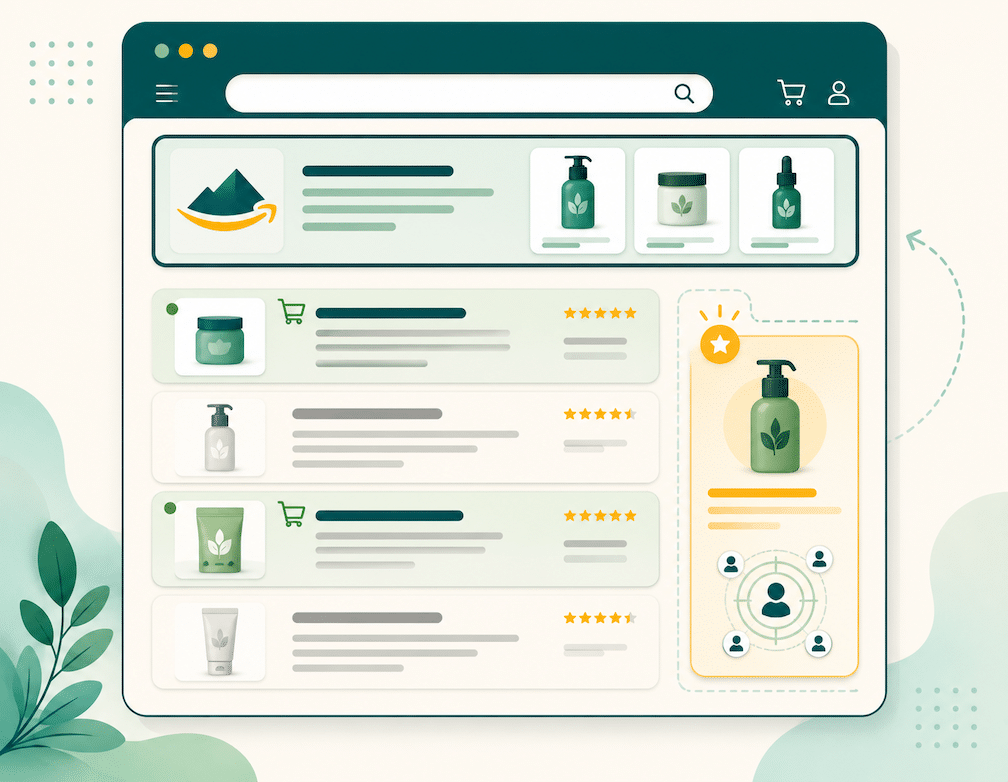
There’s a practical reason beyond performance. Sponsored Products is the only one of the three with no Brand Registry requirement. Any professional seller with a Buy Box on a new-condition product can run them. Sponsored Brands and Sponsored Display both require Brand Registry enrollment, which means a registered or pending trademark from a supported IP office. If you’re not yet registered, the decision is made for you: Sponsored Products is your entire toolkit until that clears.
But registered or not, the sequencing logic holds. Sponsored Products does two jobs at once. It captures high-intent demand, and it generates the search-term data every other campaign type depends on. Run automatic and manual Sponsored Products campaigns, pull your search term report weekly, and you learn which queries actually convert. (Our Amazon PPC bid strategy guide walks through the auto-to-manual workflow in detail.)
Skip this step and you’re guessing. Launch Sponsored Brands on keywords you haven’t validated, and you’re paying premium banner CPCs to test what a cheaper Sponsored Products campaign could have told you for less. Get your Sponsored Products foundation right first. For the mechanics, our Sponsored Products quick-start guide covers setup.
When Should You Add Sponsored Brands?
Add Sponsored Brands once you know which keywords convert and you have a brand worth defending.
Those are two separate triggers, and both matter. The keyword trigger is straightforward: once your Sponsored Products search term data shows a set of terms converting profitably, Sponsored Brands lets you claim the top-of-search banner on those same terms. You’re no longer testing. You’re amplifying a known winner with a format that occupies prime real estate competitors can’t push you out of as easily.
The brand-defense trigger is the one sellers underweight. When shoppers start searching your brand name directly, those branded searches become valuable territory. Run Sponsored Brands on your own branded terms and you control the entire top of that results page, which keeps competitors from buying their way in front of shoppers who were already looking for you. This matters more as you grow. A brand nobody searches for doesn’t need brand defense. A brand with real branded search volume that ignores it is leaving the door open.
Are your Amazon Ad types competing instead of compounding?
Canopy's Partners Achieve an Average 84% Profit Increase!
Get Your Free PPC AuditA few access details that trip people up. Sponsored Brands requires a minimum of three ASINs for the standard formats (one ASIN for video), and linking your ad to a Store destination requires an active Brand Store, which is free for Brand Registry sellers. Creative goes through a moderation review that typically takes up to 72 hours, so build that lead time into any launch tied to a deal or seasonal window. The Sponsored Brands quick-start guide covers creative requirements.
Where brands get this wrong: they treat Sponsored Brands as a standalone awareness play, running it in isolation and judging it on direct ACoS alone. It works best layered on top of Sponsored Products on your highest-converting terms, not off in its own corner of the account.
When Should You Add Sponsored Display?
Add Sponsored Display once you have meaningful conversion volume and a retargeting pool worth re-engaging.
This is the format sellers add too early or ignore entirely, and both mistakes cost money. The logic is about supply. Sponsored Display’s strongest use is views remarketing, reaching shoppers who visited your product page and left without buying. That only works if enough shoppers are visiting your pages to build a pool worth targeting. A brand sending a few hundred visitors a week to a listing doesn’t have enough warm-shopper supply to make retargeting efficient. A brand sending thousands does.
So the trigger isn’t a revenue number on its own. It’s whether your Sponsored Products and Sponsored Brands campaigns are already generating enough page traffic to fill a retargeting pipeline. Once they are, Sponsored Display becomes the layer that catches the consideration-stage shopper who didn’t convert on the first touch.
Here’s the pattern we watch for. If your Sponsored Products ACoS on a stable set of keywords is creeping up quarter over quarter, the warm shopper may be returning through full-priced Sponsored Products clicks instead of a cheaper Sponsored Display retargeting touch. That rising ACoS is sometimes a symptom of an empty retargeting layer, not a keyword problem. It’s a useful diagnostic, and it’s the kind of thing that’s easy to miss when you’re looking at each campaign type in isolation.
Sponsored Display for sellers requires Brand Registry, same as Sponsored Brands. (Non-endemic brands not selling on Amazon can access display inventory, but that runs through Amazon DSP, not self-serve Sponsored Display.) The Sponsored Display quick-start guide covers targeting setup.
Putting the Sequence Together by Stage
The framework maps cleanly to growth stage.
Early stage, before Brand Registry or before validated keyword data: run Sponsored Products only. Build the search-term foundation. Resist the urge to fragment a small budget across formats you can’t yet feed properly.
Growth stage, with Brand Registry and a set of proven converting keywords: layer Sponsored Brands on your winning terms and your branded searches. You now have two formats working the same high-intent keywords from different angles, plus brand defense on your own name.
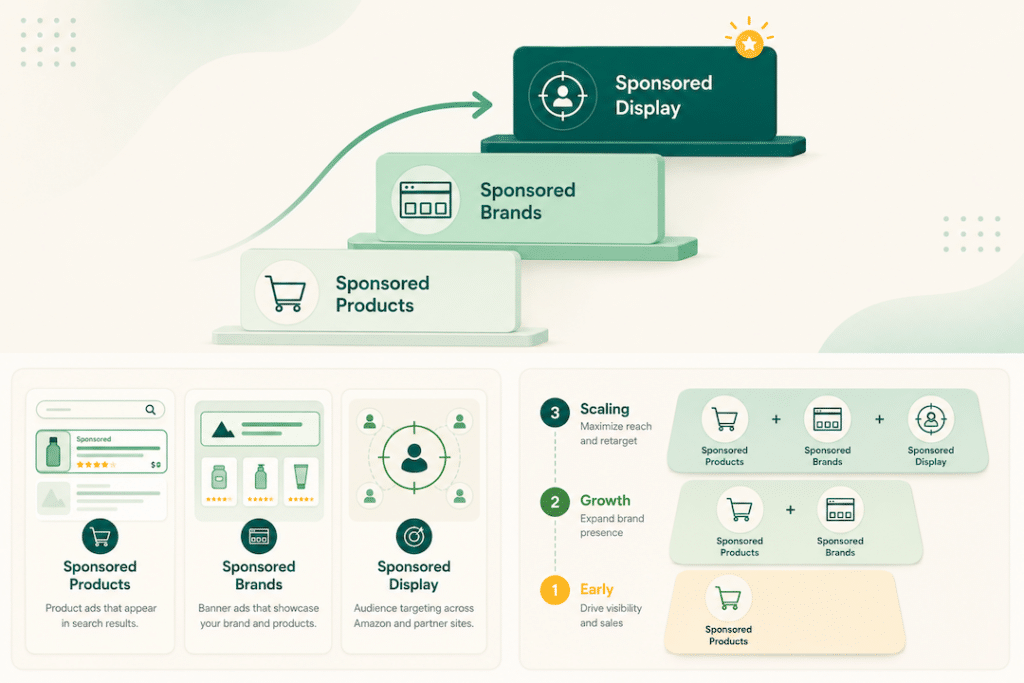
Scaling stage, with strong page traffic and a real retargeting pool: add Sponsored Display views and purchases remarketing to recapture the shoppers your first two layers brought in but didn’t close. This is where the three formats finally operate as a system, each one feeding the next.
The mistake that cuts across every stage is adding formats faster than the account can support them. A campaign type you can’t feed with data or traffic isn’t diversification. It’s dilution. Add each layer when the trigger is met, not when you happen to have budget left over.
If you want to go deeper on how much to put behind each format once all three are running, that’s a budget-allocation question, and it’s a separate decision from this sequencing one.
How Canopy Approaches the Three-Format Stack
We manage Sponsored Products, Sponsored Brands, and Sponsored Display across brands at every stage of scale, and the sequencing decision is one of the first things we audit when a new partner comes on. More often than not, the issue isn’t that a brand is running the wrong ad type. It’s that the formats were added in the wrong order, or run in isolation, so they compete instead of compound.
Canopy Management is a full-service omnichannel agency based in Austin, Texas. We run Amazon, Walmart, TikTok Shop, Shopify, Meta, and Google for brands doing $20K to $1.5M in monthly revenue, with the same dedicated brand manager owning the account for the life of the engagement.
The numbers we lead with: $3.3 billion in partner revenue, 84% average year-over-year profit increase, and 99.1% partner retention.
Schedule a strategy session to see how we’d approach your account.
Frequently Asked Questions
No. Sponsored Products requires only a professional seller account, a Buy Box, and a new-condition product. Sponsored Brands and Sponsored Display both require Amazon Brand Registry enrollment, which means a registered or pending trademark from a supported IP office. If you’re not registered yet, Sponsored Products is your only available format until that clears.
Yes, and on your highest-converting terms you usually should. The two formats occupy different placements (banner top-of-search versus in-line search results), so running both lets you claim more of the page on keywords you’ve already proven convert. The key is validating the keyword with Sponsored Products data first, then adding Sponsored Brands on top.
One common cause is a missing retargeting layer. If shoppers visit your listing, leave, then return later through a full-priced Sponsored Products click, your ACoS climbs because you’re paying peak cost for a shopper a cheaper Sponsored Display retargeting touch could have recaptured. Rising ACoS on stable keywords is worth investigating as a campaign-structure signal, not just a bidding one.
Plan for creative moderation, which typically takes up to 72 hours, though it’s often faster. Build that lead time into any launch tied to a deal, holiday, or seasonal event so your campaign is live and learning before the traffic peak hits.
Often not yet. Sponsored Display’s strongest use, views remarketing, depends on having enough page traffic to build a worthwhile retargeting pool. A brand with low listing traffic doesn’t have the warm-shopper supply to make it efficient. Get Sponsored Products and Sponsored Brands driving real volume first, then add Sponsored Display once there’s a pool to retarget.
Rarely. The sequence exists because each format depends on what the earlier one builds. Sponsored Display retargeting needs traffic, and Sponsored Products plus Sponsored Brands are what generate that traffic at scale. Skipping ahead usually means running a format before the account can feed it
Are your Amazon Ad types competing instead of compounding?
Canopy's Partners Achieve an Average 84% Profit Increase!
Get Your Free PPC Audit